

Windsurf
4.3/5Coding ToolsNow Devin Desktop — Cognition's agent-first AI code editor.
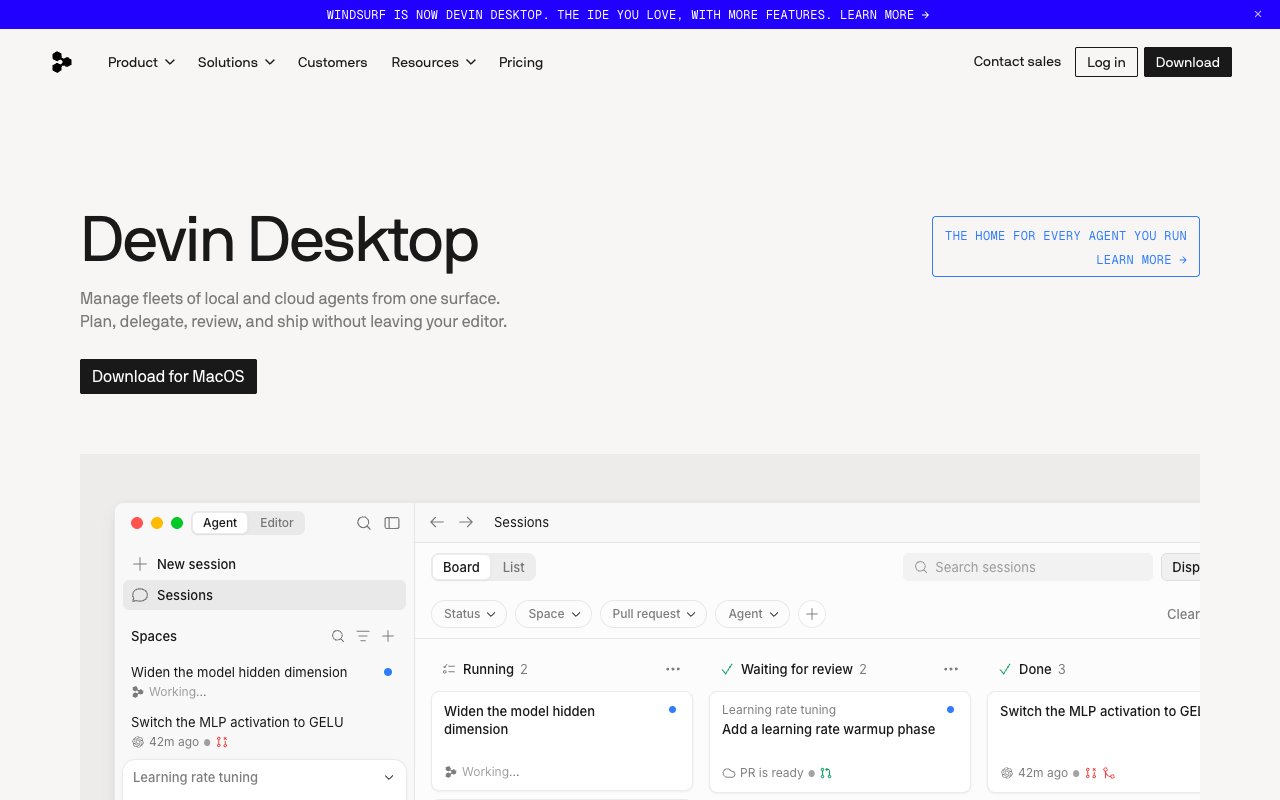
Windsurf was rebranded to Devin Desktop in June 2026 after Cognition — the company behind the Devin coding agent — acquired it. It is still a VS Code fork that competes directly with Cursor, but the product now centers on dispatching autonomous agents: Devin Local on your machine, cloud sessions for background work.
Tovorify score
Recommended
#4 in Coding Tools
| Category | AI Coding Tools |
| Pricing | Free plan with light quota and unlimited Tab. Pro $20/month. Max $200/month. Teams $80/month + $40 per seat. |
| Free plan | Yes |
| Best for | Developers who want an agent-first workflow, Teams already using Devin cloud agents, Students (roughly 50% off Pro) |
Plans at a glance
USD per month
- Free$0
- Pro$20
- Max$200
- Teams$80
Pros and cons
What works
- Devin Local runs multi-step tasks with subagents working in parallel
- Unlimited Tab autocomplete on every plan, including Free
- Local and cloud agents managed from one Agent Command Center
- Pro at $20/month includes Claude, GPT and Gemini within its quota
Worth knowing
- Mid-transition: Cascade retired in July 2026, workflows need re-learning
- Smaller community than Cursor
- Still behind Cursor on codebase indexing for very large repos
How Windsurf became Devin Desktop
Windsurf changed hands twice in one week of July 2025: Google paid $2.4 billion to bring the founders and research leads into DeepMind, and days later Cognition — the company behind the Devin coding agent — acquired the product, brand, and remaining team. On June 2, 2026, Cognition renamed the editor Devin Desktop. Existing installs updated automatically.
Underneath, it is still a VS Code fork like Cursor — same interface family, same extension support, same keybindings. What changed is the center of the product. Devin Desktop opens on an Agent Command Center: a board for dispatching and monitoring agents, local and cloud, rather than an editor canvas.
Devin Local is the on-machine agent that replaced Cascade in July 2026. It runs multi-step tasks — read the error, edit the file, re-run the test — and can spawn subagents to work parts of a task in parallel. Cloud sessions handle longer background work: you describe a goal, an agent works on it remotely, and the result comes back for review.
Tab, the inline autocomplete, is still there and is unlimited on every plan. For developers who use completion heavily and agents occasionally, that alone makes the free tier worth having installed.
Devin Local in practice
Devin Local is the reason to evaluate Devin Desktop rather than defaulting to Cursor. It runs a read-plan-act-verify cycle for each step: read the affected file, plan the change, apply it, check terminal output or test results, then decide the next action — without waiting for your approval between steps. On a mid-sized project, a refactor that would take twenty manual prompts in a reactive tool finishes in a handful of dispatched tasks.
The subagent model is the practical upgrade over the old Cascade: a task like "migrate all API calls to React Query" fans out across files in parallel instead of working through them one at a time. The tradeoff is the same as it always was — speed against transparency. You see fewer confirmation checkpoints, so trust builds task by task.
If you were a Windsurf user with workflows tuned for Cascade, budget a few days of re-learning. Cascade reached end of life on July 1, 2026; the concepts carry over, but the interface now runs through the Agent Command Center.
Devin Desktop vs Cursor on price
Devin Desktop Pro costs $20/month, and since October 2026 that makes it cheaper than Cursor for most professional use. Cursor replaced its $20 Pro plan with Premium at $30, and bills Claude and GPT on top. Devin Pro includes frontier models from OpenAI, Anthropic, Google and SpaceXAI within its quota, plus free use of its own SWE-2 model and access to Devin Cloud agents.
The free plan has a light quota for agent work, but inline edits and Tab completions are unlimited and never consume quota. That makes the free tier genuinely usable as a completion-only editor.
Quotas refresh daily and weekly. Model choice affects how fast you use them: smaller models like Haiku or open-source models stretch the allowance, frontier models on big tasks burn it faster, and extra usage is billed at API pricing. Max at $200/month raises quotas significantly, and Teams costs $80/month plus $40 per full developer seat.
Prices checked on devin.ai/pricing on October 22, 2026. For the head-to-head against Cursor, see the Cursor vs Windsurf comparison.
Who Windsurf is for
Devin Desktop makes most sense for three groups: developers who want an agent-first workflow, where you describe tasks and review results rather than steering every edit; teams already using Devin's cloud agents, since local and cloud work now live in one product; and developers currently on GitHub Copilot who want real agent capabilities without paying for two tools.
The best fit is solo developers who want autonomous code execution without constant approval prompts, and teams where wide-reaching multi-file changes are the primary task. Devin Local's subagents handle the kind of refactor that touches a dozen files across multiple directories with far less manual prompting than a reactive tool.
Language support covers Python, JavaScript, TypeScript, Go, Rust, Java, C++, and Ruby — the same breadth as Cursor. Worth noting: Devin Desktop is a standalone editor, not a plugin, so developers tied to JetBrains IDEs cannot use it without switching editors entirely.
Students are a specific good fit: roughly half off Pro with a .edu address, plus unlimited free Tab autocomplete for the completion-only days.
When to choose Cursor instead
Cursor is the better choice for large production codebases. Its indexing is more mature, its multi-file editing is more reliable, and its community is larger — which means more documented workflows and more third-party integrations. Since October 2026, Devin Desktop Pro ($20) is cheaper than Cursor Premium ($30), and it includes Claude and GPT in its quota.
Developers who prefer explicit control over every AI action will find the agent-first model frustrating. Devin Local acts autonomously between prompts — it runs tests, edits files, and takes next steps without asking. If you prefer accepting or rejecting each suggestion line by line, Cursor's workflow is closer to that.
There is also a timing consideration: the product is mid-transition. Cascade retired in July 2026, Devin Local is new, and documentation and community answers are still catching up to the rename. If you need a tool that is stable this quarter, Cursor is the safer pick; revisit Devin Desktop once the dust settles.
JetBrains users have no path to Devin Desktop without switching editors entirely — no plugin exists as of mid-2026.
Our verdict
Windsurf
4.3/5Windsurf was rebranded to Devin Desktop in June 2026 after Cognition — the company behind the Devin coding agent — acquired it. It is still a VS Code fork that competes directly with Cursor, but the product now centers on dispatching autonomous agents: Devin Local on your machine, cloud sessions for background work.
Best for
Developers who want an agent-first workflow, Teams already using Devin cloud agents
Pricing
Free plan with light quota and unlimited Tab. Pro $20/month. Max $200/month. Teams $80/month + $40 per seat.
Frequently Asked Questions
Articles about Windsurf
Windsurf compared to alternatives

Founder, Tovorify — reviews every tool on this site